 EDS Coder
If you come from classic AEM (author, publish, dispatcher, Java bundles), Edge Delivery Services can feel like magic. There's no publish tier to scale, no dispatcher cache rules and no Maven build, and pages still load in under a second. Under the hood it's a small number of simple, well-separated pieces.
This post walks through them, from the moment an author types a sentence to the moment a visitor's browser decorates a block.
The big idea: content and code travel separately#
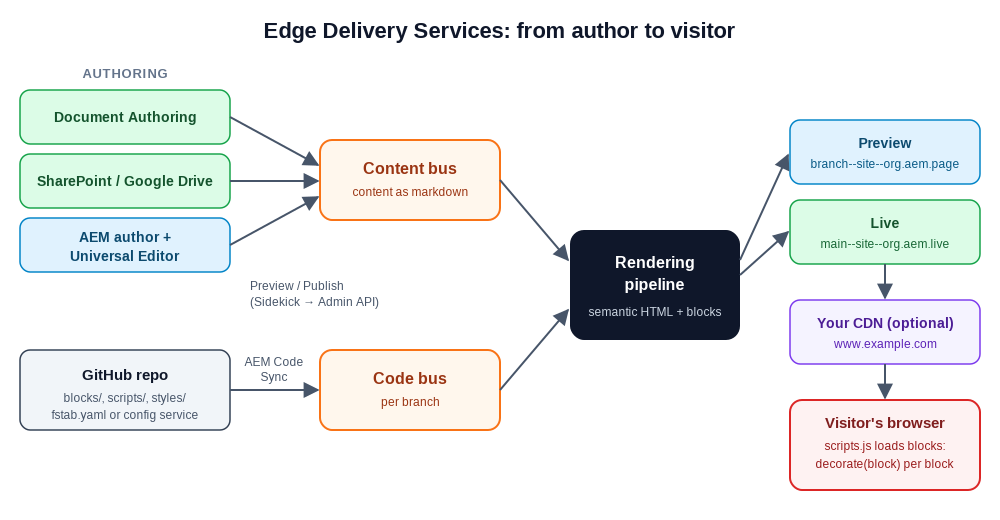
In classic AEM, content and code live in the same repository and are combined on the publish tier at request time. EDS separates them:
- Content comes from wherever authors work and is stored, after preview, in the content bus.
- Code comes from a GitHub repository and is stored, per branch, in the code bus.
- A rendering pipeline at the edge combines the two into fast, semantic HTML.
Because they're separate, a developer can ship code in seconds without touching content, and an author can publish content without a code deployment.
1. Authoring sources#
EDS supports several ways to author:
| Source | Who it's for |
|---|---|
| Document Authoring (da.live) | Teams who want a document-like editor built for EDS |
| SharePoint / Google Drive | Teams already living in Word or Google Docs |
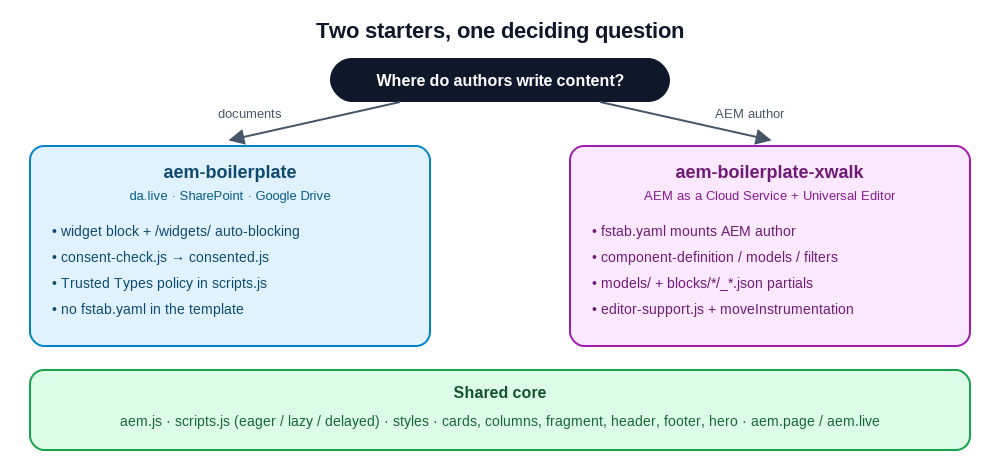
| AEM author + Universal Editor | Enterprises that need AEM governance: workflows, MSM, Content Fragments |
In document-based authoring, a horizontal rule creates a new section, and a table whose first row names a block (Cards, Hero (dark)) becomes a block. In Universal Editor projects, the same structure comes from component models.
Where content is mounted is configured per site: traditionally in fstab.yaml in the repo, and increasingly through the configuration service.
# fstab.yaml (document-based example)
mountpoints:
/: https://content.da.live/my-org/my-site/2. Preview and publish#
Authors use Sidekick, a browser extension, or the editor's own buttons to Preview and Publish. Behind those buttons is the Admin API:
- Preview converts the document into Markdown-like content in the content bus and makes it available at
https://main--site--org.aem.page/path. - Publish promotes it to
https://main--site--org.aem.live/path.
Two environments, two hostnames, no publish tier. If you run your own CDN in front, EDS purges it when content is published (push invalidation for supported CDNs), so caches stay fresh without short TTLs.
3. Code: GitHub → code bus#
Install the AEM Code Sync GitHub app on your repo. Every push to any branch syncs into the code bus, and every branch gets its own URL:
https://<branch>--<repo>--<org>.aem.page/So feature branches are automatically testable with real content, and merging to main puts code live in seconds. Pull requests also get an automatic PageSpeed Insights check on the branch preview.
A typical project layout:
blocks/
  hero/        hero.js  hero.css
  cards/       cards.js cards.css
scripts/
  aem.js       # helper library from the boilerplate (don't edit)
  scripts.js   # page loading: eager → lazy → delayed
  delayed.js   # third-party and martech
styles/
  styles.css   # critical CSS
  lazy-styles.css
  fonts.css
head.html      # what goes in every <head>
4. The rendering pipeline#
When a request hits aem.live, the pipeline takes the content for that path, renders clean HTML (sections as <div>s, blocks as <div class="blockname variant"> with nested rows and cells), and adds your head.html. The output is deliberately plain. There's no component-specific server code. All presentation happens in the browser, in your blocks.
The HTML for a cards block looks roughly like this:
<div class="cards highlight">
  <div>
    <div><picture>…</picture></div>
    <div><p><strong>Fast</strong></p><p>Loads in under a second</p></div>
  </div>
</div>
5. In the browser: decoration and blocks#
scripts.js runs the page in three phases:
- Eager: decorate sections and the first section's blocks, load the LCP image.
- Lazy: decorate the remaining blocks, load header, footer and fonts.
- Delayed: load
delayed.jswith third-party scripts, about three seconds later.
For each block, the loader imports blocks/<name>/<name>.css and blocks/<name>/<name>.js, then calls the module's default export:
// blocks/cards/cards.js
export default function decorate(block) {
  const ul = document.createElement('ul');
  [...block.children].forEach((row) => {
    const li = document.createElement('li');
    li.append(...row.children);
    ul.append(li);
  });
  block.replaceChildren(ul);
}
That's the whole component model: an author-produced table in, a decorated DOM out.
Classic AEM vs Edge Delivery Services#
| Classic AEM Sites | Edge Delivery Services | |
|---|---|---|
| Rendering | Publish tier (HTL + Sling) | Edge pipeline + browser decoration |
| Caching | Dispatcher + CDN rules | Edge-native, push invalidation |
| Code deploy | Cloud Manager pipeline (minutes–hours) | Git push (seconds) |
| Front end | HTL, clientlibs | Vanilla JS/CSS blocks |
| Preview | Author / preview tier | .aem.page per branch |
| Scaling | Publish instances | Not your concern |
| Performance baseline | Needs tuning | 100 Lighthouse from the boilerplate |
What architects should take from this#
- Fewer moving parts to operate. No publish farm, no dispatcher configuration to maintain.
- Clear ownership. Authors own content, developers own blocks, and the pipeline owns rendering.
- Integrations happen in the browser or at the edge. Personalization, commerce and forms call APIs from blocks, or use Adobe's EDS-integrated services. There's no server-side Java to put them in.
- Governance depends on the authoring source. Need workflows and MSM? Use AEM author with the Universal Editor. Need speed? Use document-based authoring.
Key takeaways#
- Content and code travel separately (content bus, code bus) and meet in the rendering pipeline.
.aem.pageis preview,.aem.liveis live, and every Git branch gets its own preview URL.- The server outputs plain semantic HTML, and blocks decorate it in the browser.
- The architecture is simple, which is why it's fast and why teams adopt it quickly.
Sources: aem.live documentation · aem.live: Anatomy of a project · aem.live: Markup, Sections, Blocks and Auto Blocking · Universal Editor introduction