 EDS Coder
Every Edge Delivery Services (EDS) project starts by copying one of two GitHub templates:
- adobe/aem-boilerplate, the standard starter for document-based authoring.
- adobe-rnd/aem-boilerplate-xwalk, the starter for authoring in AEM as a Cloud Service with the Universal Editor. "xwalk" is short for crosswalk, Adobe's name for connecting AEM authoring to EDS delivery.
They look almost identical at first glance: same blocks/, scripts/ and styles/ folders, same three-phase loading, same 100 Lighthouse target. The difference is where content comes from, and that decides almost everything else.
This comparison is based on both repositories as of November 2026.
The one question that decides it#
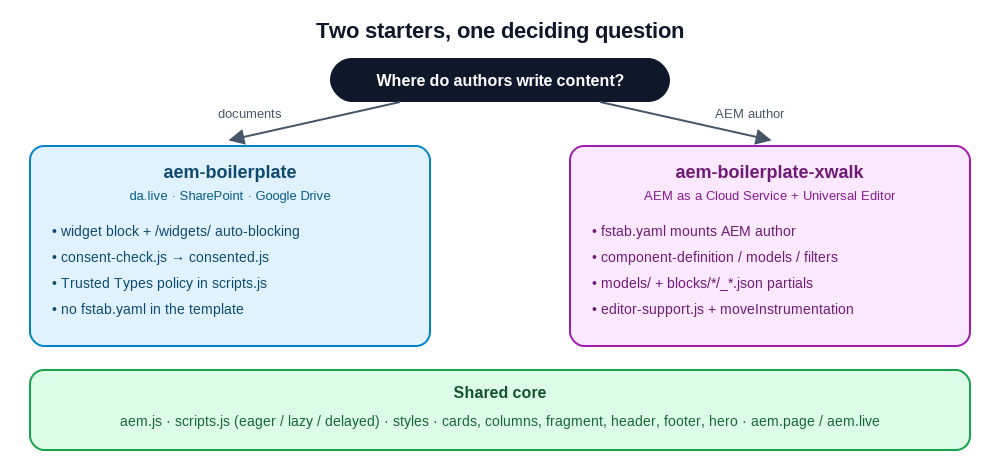
Where will your authors write content?
- In da.live (Document Authoring), SharePoint or Google Drive →
aem-boilerplate. - In AEM author, using the Universal Editor →
aem-boilerplate-xwalk.
If you haven't decided that yet, read Universal Editor vs Page Editor vs Document Authoring first. The boilerplate follows from the authoring decision, not the other way round.
What's the same#
Both starters share the core that makes EDS fast:
scripts/aem.js, the library that decorates sections and blocks and loads them on demand.scripts/scripts.jswithloadEager,loadLazyandloadDelayed.styles/styles.css,lazy-styles.cssandfonts.css, with the same design tokens.- The same starter blocks:
cards,columns,fragment,header,footerandhero. - The same environments:
https://main--{repo}--{owner}.aem.page/for preview and.aem.livefor live. - The AEM Code Sync GitHub app and
aem upfor local development.
A block's decorate function receives the same rows-and-cells markup in both, so block code is largely portable between them.
What only the xwalk boilerplate has#
| File or folder | What it does |
|---|---|
fstab.yaml |
Mounts content from an AEM author instance (/bin/franklin.delivery/...) instead of documents |
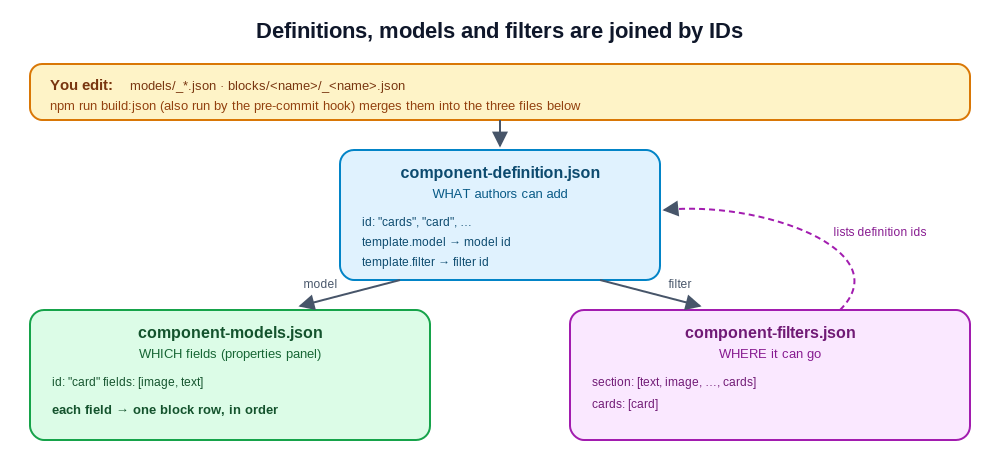
component-definition.json |
Lists the components authors can add in the Universal Editor |
component-models.json |
Defines the fields in each component's properties panel |
component-filters.json |
Controls which components can go inside which containers |
models/ and blocks/*/_*.json |
Source partials that are merged into the three files above |
scripts/editor-support.js, editor-support-rte.js |
Re-decorates blocks live as authors edit in the Universal Editor |
scripts/dompurify.min.js |
Sanitises editor updates before they're put into the page |
xwalk.json |
Feature flags for the AEM integration, such as multi-field support |
helix-query.yaml, helix-sitemap.yaml |
Index and sitemap configuration kept in the repo |
.husky/pre-commit |
Rebuilds the merged component-*.json files when you commit a changed partial |
It also adds moveInstrumentation() to scripts.js. Block code calls it to carry the editor's data-aue-* attributes over to the new elements it creates, so authors can still select and edit them after decoration. Compare the two cards.js files and that's the only difference.
The xwalk README lists AEM Cloud Service release 2026.4 or newer as a prerequisite.
What only the standard boilerplate has#
The standard starter has moved faster on front-end features that don't depend on AEM:
- A
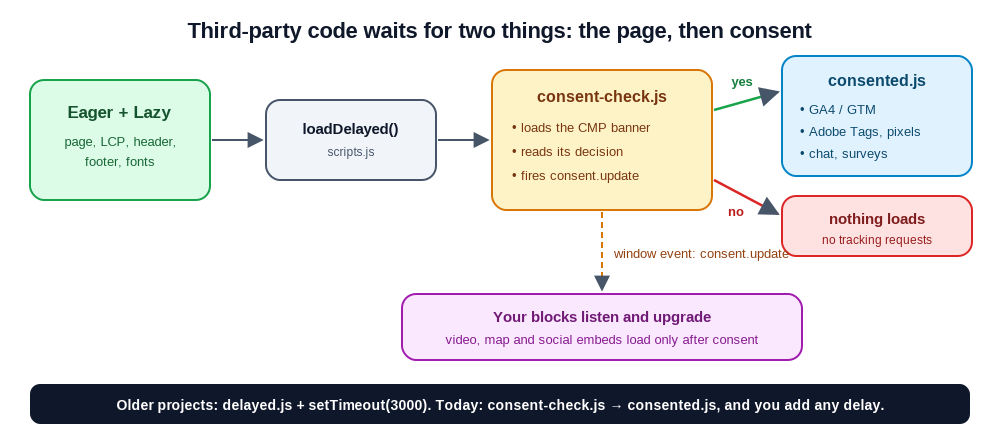
widgetblock and auto-blocking that turns links to/widgets/...into widget blocks. - Consent-aware delayed loading.
loadDelayed()importsconsent-check.js, which only loadsconsented.js(your analytics and martech) after consent is given. The xwalk starter still uses the older pattern:delayed.js, imported three seconds after load. - A Trusted Types policy in
scripts.js. - No
fstab.yaml. The template doesn't ship a content mount, because new document-based sites are usually connected through da.live and the configuration service.
None of these are tied to document authoring. If you start from xwalk and want consent-gated martech or the Trusted Types policy, copy them across.
Can you switch later?#
The code, mostly yes. The content, no.
- Moving blocks from the standard boilerplate to xwalk means adding a
_<block>.jsonmodel for each block andmoveInstrumentationcalls where yourdecoratereplaces elements. - Moving the other way means deleting those files; the block code keeps working.
- Content can't move with a config change. Documents and AEM pages are different stores, so changing authoring means migrating content.
That asymmetry is a good reason to design block content contracts that work in both: one row per field, in a fixed order, with no layout that only a document table can express.
A quick decision checklist#
Choose aem-boilerplate-xwalk if:
- Your organisation already runs AEM as a Cloud Service and wants authors in AEM.
- You need AEM features: workflows, MSM and language copies, Content Fragments, granular permissions.
- Authors want to edit visually, in place, on the rendered page.
Choose aem-boilerplate if:
- Authors are comfortable in documents and you want the fastest path to a live site.
- You don't have, or don't want to license, an AEM author tier for this site.
- You want the newest front-end defaults out of the box.
Why EDS Coder starts from xwalk#
EDS Coder clones aem-boilerplate-xwalk for every new project. The blocks it generates include a Universal Editor model alongside the JavaScript and CSS, so they're ready for AEM authoring. Because the decorate code reads plain rows, the same blocks still render document-authored content. Starting with the larger starter means nothing has to be added later.
Sources: adobe/aem-boilerplate on GitHub · adobe-rnd/aem-boilerplate-xwalk on GitHub · aem.live: AEM authoring · aem.live: Universal Editor tutorial · aem.live: Anatomy of a project