 EDS Coder
A fresh Edge Delivery Services site built from the boilerplate scores 100 on Lighthouse mobile. That's one of the main reasons teams pick EDS. Six months and twenty blocks later, many of those sites score in the 70s. Nothing in EDS got slower: the team made small decisions that each cost two points.
This post explains the loading model EDS is built on, the mistakes that break it, and a checklist to keep you at 100.
The model: Eager, Lazy, Delayed#
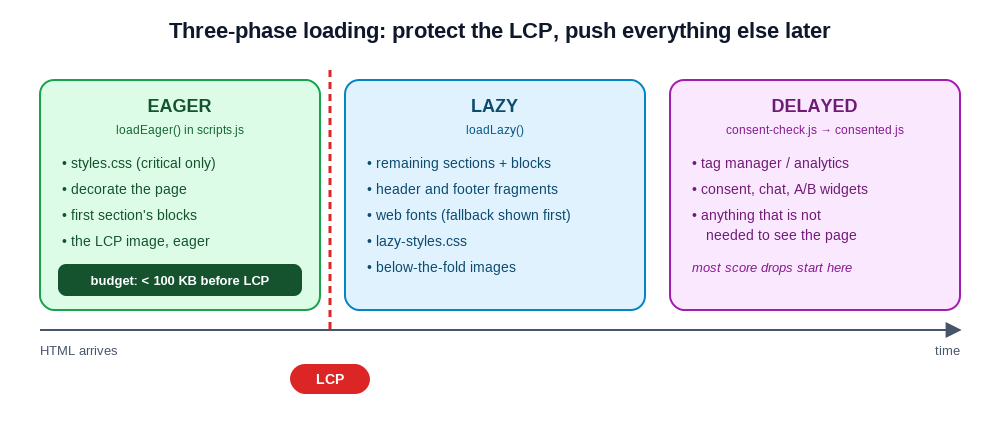
Everything in scripts/scripts.js follows three phases. Learn them and most performance decisions become obvious.
1. Eager: get to LCP as fast as possible#
loadEager() decorates the page, loads styles.css, and loads only the first section and its blocks. The body stays hidden until that first section is ready, which avoids layout shift. The first image is loaded with high priority because it's usually the Largest Contentful Paint (LCP) element.
Rule of thumb from aem.live: keep everything that loads before LCP under about 100 KB.
2. Lazy: the rest of the page#
loadLazy() loads the remaining sections and blocks, the header and footer, lazy-styles.css, and web fonts. Fallback fonts render first, so text is never invisible. Below-the-fold images load lazily.
3. Delayed: everything the visitor doesn't need to see the page#
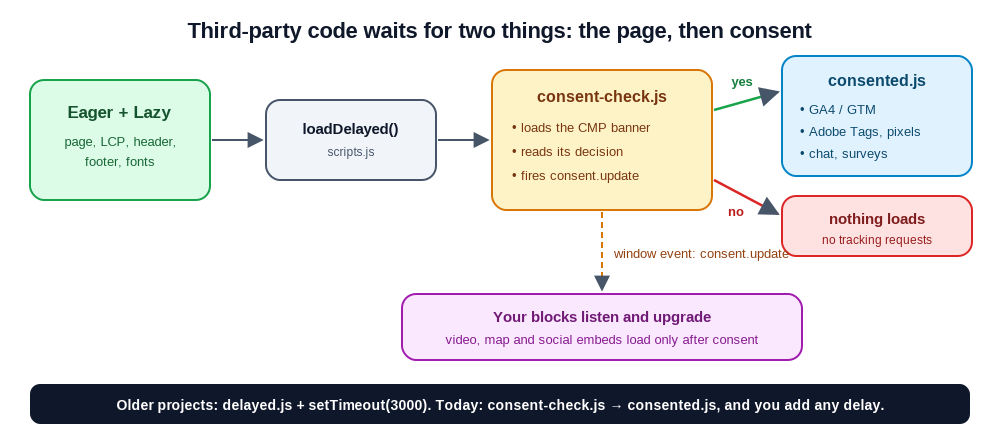
loadDelayed() runs after the page has loaded. In the current boilerplate it imports scripts/consent-check.js, which loads scripts/consented.js only once the visitor has consented. That's where tag managers, analytics, chat widgets and A/B tools belong. Older projects used scripts/delayed.js behind a three-second setTimeout. The new gate has no timer, so add your own delay if your tags are heavy. The details are in Analytics, Tag Managers and Consent on EDS.
If you remember one thing: phase 3 is where third-party code goes, and putting it anywhere else is the most common reason scores drop.
The seven mistakes that cost you points#
1. Martech in the <head>#
Someone pastes the tag manager snippet into head.html because "the vendor said so". That's a blocking request to a third-party domain before LCP. Move it behind the consent gate in consented.js (or delayed.js on older projects). If marketing needs earlier data, have that conversation with numbers, and look at Adobe's guidance on loading martech for EDS.
2. A hero image that isn't optimized#
Authors upload a 4 MB PNG. EDS can deliver optimized webp renditions, but only if your block uses them. Always go through createOptimizedPicture:
import { createOptimizedPicture } from '../../scripts/aem.js';

// eager = true only for the LCP image
const picture = createOptimizedPicture(img.src, img.alt, true, [
  { media: '(min-width: 600px)', width: '2000' },
  { width: '750' },
]);
Pass eager: true only for the first, above-the-fold image. Everything else stays lazy.
3. Something heavy in the first section#
A carousel, a video or an embedded map as the very first block adds JavaScript and bytes to the critical path. Make the first section a simple hero. If it must be a carousel, render the first slide as static HTML and add the interaction later.
4. Web fonts without fallbacks#
A custom font with no size-adjusted fallback causes layout shift (CLS) when it swaps in. The boilerplate pattern is a local fallback font with size-adjust in styles/styles.css, and the real fonts loaded lazily from fonts.css. Keep that pattern whenever you change brand fonts.
@font-face {
  font-family: roboto-fallback;
  size-adjust: 99.529%;
  src: local('Arial');
}
body { font-family: roboto, roboto-fallback, sans-serif; }
5. Adding a framework "just for one block"#
Importing a UI library for one interactive block adds tens of KB, often eagerly. EDS blocks are vanilla JS on purpose. If you really need a library, load it inside that block with a dynamic import(), so only pages that use the block pay for it.
6. Layout shift from late-decorated blocks#
If a block's final height differs a lot from its raw HTML, the page jumps when it decorates. Reserve space with CSS: aspect-ratio on media, and a min-height on blocks whose content arrives later (forms, embeds).
7. Big CSS in styles.css#
styles.css is render-blocking. Anything not needed for the first section belongs in the block's own CSS file (loaded with the block) or in lazy-styles.css.
Use the guardrails EDS gives you#
- PageSpeed check on every pull request. EDS projects connected through AEM Code Sync get a PageSpeed Insights check on the PR's branch preview. Treat a drop below 100 as a failing build, and don't merge until it's understood.
- Real User Monitoring (RUM). EDS collects privacy-friendly field data. Lighthouse is a lab test. RUM tells you what real visitors on real phones experience, especially for INP (interaction delay).
- Branch previews. Test the change on
feature--site--org.aem.pagebefore it ever reachesmain.
A pre-merge checklist#
Copy this into your PR template:
### Performance
- [ ] No new script or stylesheet in head.html
- [ ] Third-party code is loaded from scripts/consented.js, behind the consent gate
- [ ] Images use createOptimizedPicture; only the LCP image is eager
- [ ] First section has no carousel/video/embed (or renders statically first)
- [ ] New fonts have a size-adjusted fallback
- [ ] No new framework; heavy libraries are dynamically imported in the block
- [ ] Media has aspect-ratio; late content has min-height
- [ ] PageSpeed check on the PR preview is 100 (mobile)
Why it matters beyond the score#
Lighthouse is a proxy. What you're protecting is Core Web Vitals (LCP, CLS, INP), which are a Google ranking signal and strongly linked to conversion. A site that stays at 100 doesn't need a "performance project" every year. Its performance holds because the team follows the three phases in every PR.
Key takeaways#
- EDS loads in three phases: eager (to LCP), lazy (the rest), delayed (consent-gated third parties).
- Keep the pre-LCP payload under about 100 KB, and keep the first section simple.
- Third-party scripts belong in
consented.js, behindconsent-check.js. Moving them earlier is the most common reason scores drop. - Gate every PR on the PageSpeed check, and watch RUM for real-world results.
Sources: aem.live: Keeping it 100, Web Performance · aem.live developer documentation · web.dev: Core Web Vitals