 EDS Coder
The first Edge Delivery Services site is easy: one GitHub repository, one content folder, one domain. The questions start with the second. Do brands get their own repositories? How do the German pages get a German nav? Who maintains hreflang?
EDS has good answers to all of these. They're spread across several docs, though, and the older answer (copy the repository) is still common. This guide puts the current approach in one place.
Two different problems#
Separate them before you design anything:
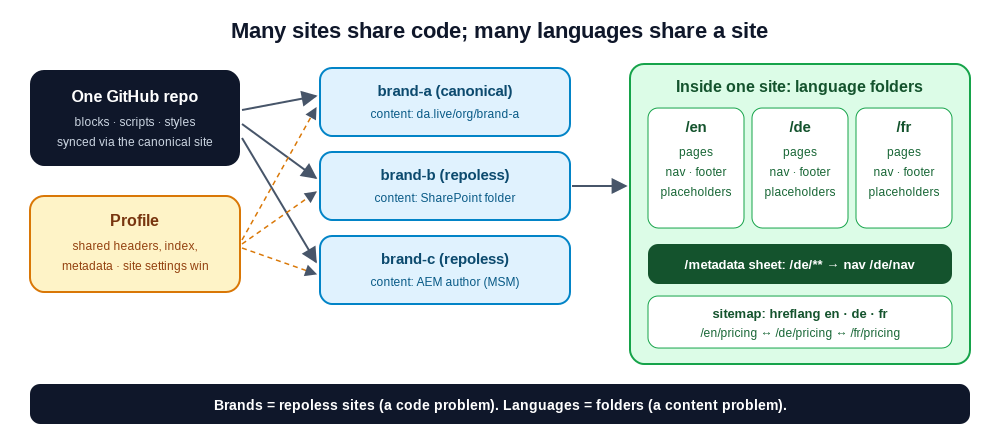
- Many sites: different brands, or markets with mostly different content, that share the same blocks and design system. This is a code reuse problem. The answer is repoless sites.
- Many languages: the same site translated, with market variations. This is a content structure problem. The answer is language folders inside one site.
Large organizations usually have both: a few repoless sites, each with several language folders.
Repoless: one codebase, many sites#
"Repoless" means every site after the first one doesn't need a GitHub repository of its own. It's built on the configuration service, which introduces a few concepts:
| Concept | What it is |
|---|---|
| Organization | Matches your GitHub org name. Owns sites, profiles and users. |
| Site | Content source + code + configuration = one web experience at main--<site>--<org>.aem.page. |
| Profile | Shared configuration (headers, indexes, metadata) that many sites can reuse. A site has one profile, and the site's own settings win. |
| Code | A GitHub repository, synced by AEM Code Sync through the first, canonical site. |
| Content source | Where authors write: Document Authoring, SharePoint, Google Drive or AEM. |
You create the canonical site the normal way. Each additional site is one call to the Admin API, pointing at the same code and a different content source:
curl -X PUT https://admin.hlx.page/config/{org}/sites/{site2}.json \
  -H 'x-auth-token: {token}' \
  -H 'content-type: application/json' \
  --data '{
    "code": { "owner": "{owner}", "repo": "{repo}" },
    "content": { "source": { "url": "https://content.da.live/{org}/{site2}/" } }
  }'
The new site is live at https://main--{site2}--{org}.aem.page immediately. To develop against it locally, point the AEM CLI at it: aem up --url https://main--{site2}--{org}.aem.page.
Configuration moves out of files#
Once you go repoless, settings that used to live in your repository or content folder move into the configuration service. A site with no repository can't have a helix-query.yaml of its own:
| Setting | Before (document mode) | Repoless (API mode) |
|---|---|---|
| Content source | fstab.yaml |
content config |
| Index definitions | helix-query.yaml |
index config |
| Sitemap | helix-sitemap.yaml |
sitemap config |
| robots.txt | file in GitHub | robots config |
| Headers, CDN, access | .helix/*.xlsx |
site or profile config |
Put what all brands share (security headers, index definitions) in a profile, and only overrides in each site.
Different brands, same code#
Code changes now reach every site at once, which is the point and also the risk. A few habits keep it safe:
- Theme with metadata, not branches. Set a
themevalue per site in bulk metadata.decorateTemplateAndTheme()adds it as a class on<body>, and each brand's colors and fonts are CSS custom properties under that class. - Make blocks configurable through content, such as block variants and placeholders, instead of
if (site === 'brand-b')checks. - Test every site on the branch. A feature branch works for all sites:
feature--brand-b--org.aem.page. Run PageSpeed on more than one before merging.
With AEM authoring: MSM and Live Copies#
If you author in AEM with the Universal Editor, Multi Site Manager still works: blueprints in language-masters roll out as Live Copies to /content/brand/ch/de, /content/brand/de/de and so on. Each MSM site maps one to one to an aem.live repoless site that shares the Git repository. Each also needs its own AEM cloud configuration, so it publishes to the right EDS site.
Localization: one site, language folders#
Adobe recommends language first, market second for URLs:
https://example.com/en/
https://example.com/en/us/
https://example.com/es/
https://example.com/es/mx/
Market-first structures (/ca/, /ca_fr/) duplicate content for every market that shares a language. They also leave visitors stuck: an English speaker in Switzerland only gets German, French or Italian. Use a market-first structure only when markets genuinely share very little, for example because of regulation.
What each language folder contains#
/en/            pages
/en/nav         navigation for English pages
/en/footer
/en/placeholders
/de/            same structure, translated
/de/nav
...
/metadata       one bulk sheet that wires it together
Wire it with the bulk metadata sheet, so every page picks up the right chrome without per-page work:
| URL | nav | footer |
|---|---|---|
/en/** |
/en/nav |
/en/footer |
/de/** |
/de/nav |
/de/footer |
Placeholders follow the same layout. Keep strings in the language folder (/de/placeholders) and override per market only where needed (/de/ch/placeholders).
Set the page language#
The boilerplate hard-codes document.documentElement.lang = 'en' in loadEager(). On a multilingual site, set it from the path so screen readers and browsers use the right language:
const LANGS = ['en', 'de', 'fr', 'es'];

export function getLanguage() {
  const first = window.location.pathname.split('/')[1];
  return LANGS.includes(first) ? first : 'en';
}

// in loadEager()
document.documentElement.lang = getLanguage();
The same helper picks the right placeholders sheet: fetchPlaceholders(getLanguage()).
Let visitors choose, and don't geo-redirect#
Detecting language is useful only for brand-new visitors who didn't arrive from search, ads or social (those already have the right language). Even then:
- Never force a redirect based on IP or browser language. It adds a redirect to every first visit, can be illegal geo-blocking in some regions, and traps people who want another language.
- Offer a language switcher in the nav tools section that links to the same path in the other language folder, and remember the choice on the visitor's device.
- Keep language and market separate. Market decides currency, offers and legal terms. Language decides the text.
hreflang through the sitemap#
Instead of adding <link rel="alternate"> tags to every page, let the sitemap do it. Give each language its own query index, then list them in the sitemap configuration with hreflang and an alternate pattern. Pages that share a path suffix (/en/pricing, /de/pricing) are linked automatically, and default: en adds x-default. The SEO guide has the full configuration.
Translation#
Because content is documents and sheets, any translation workflow that handles Word or Google Docs works, including the built-in machine translation in Microsoft 365 and Google Workspace. Adobe's Experience Workspace also has translation projects: you list the pages, it sends them to a translation service (Google Translate by default) and saves the results into each language folder. AEM authoring has its own translation projects for MSM sites. Either way, translate folders, not pages, so nav, footer and placeholders move together.
Key takeaways#
- Many sites is a code problem: use repoless sites that share one repository through the configuration service.
- Many languages is a content problem: use language folders, language first and market second.
- Move shared settings into a profile, and theme brands with metadata and CSS custom properties.
- Wire per-language nav, footer and placeholders with the bulk metadata sheet, and set
<html lang>from the path. - Offer a switcher instead of geo-redirects, and let the sitemap generate
hreflang.
Sources: aem.live: Repoless, one codebase many sites · aem.live: Multi-site management with AEM authoring · aem.live: Translation and localization · aem.live: Sitemaps · aem.live: Placeholders