 EDS Coder
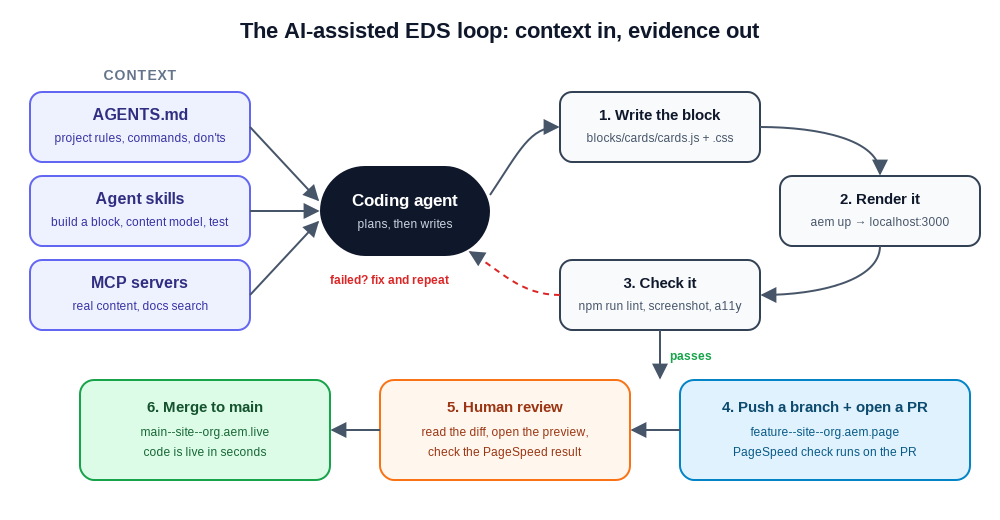
Edge Delivery Services is unusually well suited to AI coding agents. There's no Java, no OSGi, no Maven build: just vanilla JavaScript and CSS in a blocks/ folder, a local server that renders real content, and a preview URL for every branch. An agent can write a block, see it rendered and check its own work within a minute.
Getting from "the agent wrote something" to "the agent wrote something we'd merge" takes setup, though. This post shows the setup we use: context going in (AGENTS.md, skills, MCP) and evidence coming out (render, lint, screenshot, PageSpeed), with a person reviewing at the end.
Why agents get EDS wrong by default#
Out of the box, coding agents know JavaScript very well and EDS only somewhat. The typical mistakes:
- Adding npm dependencies or a bundler. EDS projects ship plain ES modules with no build step.
- Writing React-style components instead of the
decorate(block)pattern. - Inline styles and hard-coded copy that authors can't change.
- Loading third-party scripts eagerly, which drops the Lighthouse score.
- Inventing a content structure the author can't produce in a document or the Universal Editor.
Each of these comes from missing context, so the fix is to give the agent better context.
Step 1: Write an AGENTS.md#
AGENTS.md is a plain Markdown file at the repo root that coding agents read before they work. Adobe publishes an agent skill (ensure-agents-md) that generates one for you. Either way, keep it short and specific. Here's a trimmed version of ours:
# AGENTS.md

## Project
AEM Edge Delivery Services site, based on adobe/aem-boilerplate.
No build step. No npm runtime dependencies. Plain ES modules.

## Commands
- Local server: `aem up` → http://localhost:3000 (proxies real content)
- Lint: `npm run lint` (must pass before you say you're done)

## Blocks
- One folder per block: blocks/<name>/<name>.js and <name>.css
- JS exports `default function decorate(block)`; mutate the given DOM.
- CSS is scoped: every selector starts with `.<name>`.
- Use `createOptimizedPicture` from scripts/aem.js for images.
- Authors control text and images. Never hard-code copy.

## Performance
- Nothing new in the eager phase. Third-party scripts go in scripts/delayed.js.
- Don't add fonts without a fallback in styles/fonts.css.

## Don't
- Don't add frameworks, bundlers or CSS-in-JS.
- Don't edit scripts/aem.js (upstream file).
- Don't push to main.
Claude Code tip: Claude Code reads CLAUDE.md. Adobe's documentation suggests putting the real instructions in AGENTS.md and making CLAUDE.md a single line, @AGENTS.md, so every agent reads the same rules.
Step 2: Add agent skills#
Skills are packaged instructions an agent loads only when a task needs them: "build a block", "model content", "test a block", "review code". Adobe maintains open-source skills for AEM in the adobe/skills GitHub repository, including a set for Edge Delivery Services. The aem.live AI coding agents page also lists research skills, such as a docs search across aem.live documentation and blogs.
Why skills instead of putting everything in AGENTS.md? Context budget. AGENTS.md is always loaded, so it holds the rules. Skills hold the procedures, loaded only when needed. A good block-building skill makes the agent:
- Start from content: what will the author write? Draft the table or component model first.
- Write the block's JS and CSS.
- Create a test page with that content.
- Render it, check desktop and mobile, run lint.
That "content first" step is the most valuable habit you can teach an agent on EDS.
Step 3: Connect MCP servers for real context#
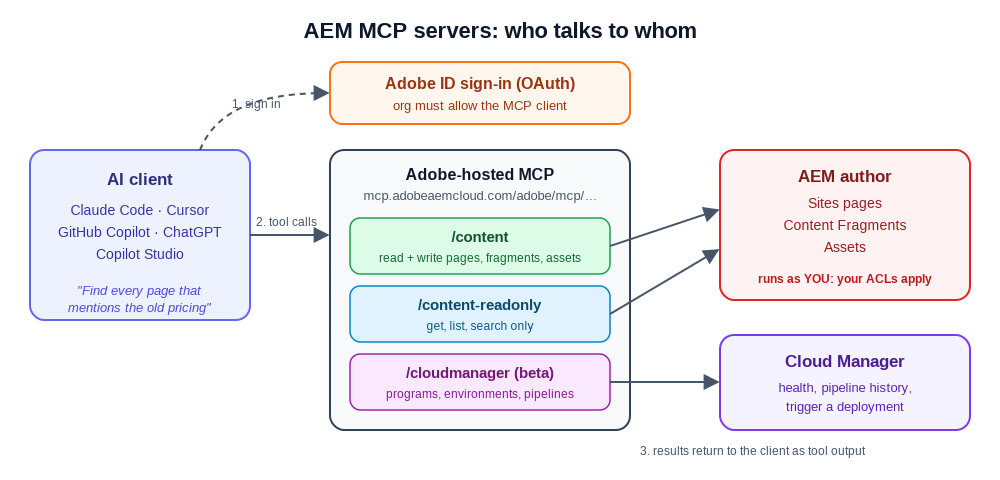
MCP servers let the agent fetch facts instead of guessing them:
- Docs search, so it reads the current aem.live documentation rather than relying on training data.
- AEM Content MCP (read-only), for Universal Editor projects, so it sees what existing pages and fragments look like before modeling a new block.
- Cloud Manager MCP (beta), if your project also has an AEM author-side codebase and you want pipeline status in the IDE.
claude mcp add --transport http aem-content-ro \
  https://mcp.adobeaemcloud.com/adobe/mcp/content-readonly
Step 4: Make the agent prove its work#
This is the step most teams skip. An agent saying "done" is not evidence. Require it to show:
| Check | How | Catches |
|---|---|---|
| It renders | aem up, open the test page |
Runtime errors, wrong selectors |
| It's clean | npm run lint |
Style and syntax issues |
| It looks right | Screenshot at 375px and 1280px, compare with the design | Layout and responsive bugs |
| It's accessible | Headings order, alt text, contrast, keyboard focus | A11y regressions |
| It's fast | PageSpeed check on the branch preview | Eager-loaded scripts, oversized images |
Put this table in your block-building skill, and ask the agent to paste the results (lint output, screenshot paths, the PageSpeed score) in its final message. If something failed, the agent fixes it and runs the checks again before it hands back.
Step 5: Branch, preview, review#
EDS gives every Git branch its own preview URL:
https://<branch>--<repo>--<org>.aem.page/drafts/test-teaserSo the flow is:
- The agent works on a feature branch and pushes.
- The pull request gets a preview URL and an automatic PageSpeed result.
- A person reads the diff, opens the preview, and checks it with real content.
- Merge to
main. The code is live onaem.livein seconds.
Never let the agent merge. The review step is cheap, and it's where you catch the "technically works, wrong for authors" issues.
A real example: building a "teaser" block#
Prompt:
Build a
teaserblock: image left, text right on desktop, stacked on mobile. An optionaldarkvariant. Authors provide image, alt text, heading, body and one link. Follow AGENTS.md and the build-block skill. Show me the lint output and screenshots at 375 and 1280.
A good result looks like this:
// blocks/teaser/teaser.js
import { createOptimizedPicture } from '../../scripts/aem.js';

export default function decorate(block) {
  const [imageCell, textCell] = block.firstElementChild.children;
  const img = imageCell?.querySelector('img');
  if (img) {
    const picture = createOptimizedPicture(img.src, img.alt, false, [{ width: '750' }]);
    imageCell.replaceChildren(picture);
  }
  imageCell?.classList.add('teaser-image');
  textCell?.classList.add('teaser-text');
}/* blocks/teaser/teaser.css */
.teaser > div { display: grid; gap: 24px; }
.teaser .teaser-image img { width: 100%; height: auto; border-radius: 8px; }
.teaser.dark { background: var(--dark-color); color: var(--background-color); padding: 24px; }
@media (width >= 900px) {
.teaser > div { grid-template-columns: 1fr 1fr; align-items: center; }
}The block is small and scoped to .teaser. It has no dependencies, all copy comes from the author, the image is optimized, and the dark variant comes from a class the author sets as "Teaser (dark)" in the document or as a variant in UE.
What changes for the team#
- Seniors write the context. AGENTS.md and skills encode your standards once, instead of in every code review.
- Reviews get faster, because the agent hands over evidence, not just a diff.
- Juniors learn the conventions by reading what the agent was told.
- Velocity grows with block count. Block number 30 is faster than block 3, because the skills have improved along the way.
Key takeaways#
- EDS suits agents well: no build, fast local render, a preview per branch.
- AGENTS.md holds the rules, skills hold the procedures, and MCP gives the agent real facts.
- Require evidence (render, lint, screenshots, PageSpeed) before "done".
- A person reviews every PR. Agents never merge.
Sources: aem.live: AI coding agents · An AEM developer's guide to AGENTS.md, skills and prompt libraries · AI-assisted development (Experience League) · Component development using AEM Agent Skills