 EDS Coder
Ask three AEM consultants which editor to use and you'll get four answers. AEM as a Cloud Service now offers three authoring experiences, each built for a different way of delivering pages. Choosing the wrong one isn't fatal, but it's expensive: it decides your content model, your component code and how your authors spend their day.
This post compares them on what matters in a real project, gives you a decision tree, and lists the gotchas.
The three editors in one sentence each#
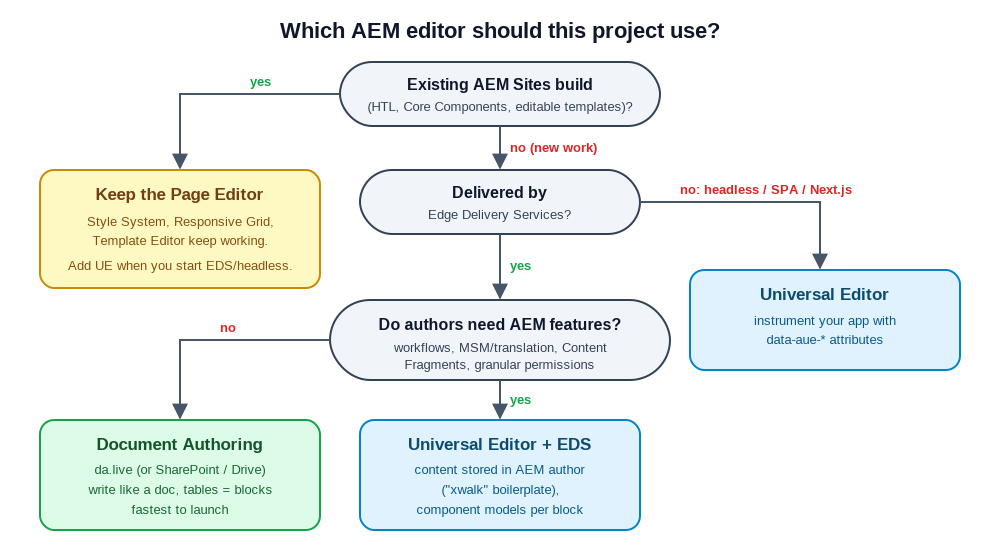
- Page Editor: the classic AEM Sites editor. Drag-and-drop components into a Responsive Grid, built on HTL, Sling Models and Core Components, rendered by AEM publish and the dispatcher.
- Universal Editor (UE): a newer visual editor that works with any front end (Edge Delivery Services, a headless React/Next.js app, an SPA) by reading
data-aue-*attributes added to the rendered HTML. Content is stored in AEM. - Document Authoring (DA): Adobe's document-style editor at da.live for Edge Delivery Services. Authors write the page like a document, and tables become blocks. It replaces the older SharePoint/Google Drive approach for many teams. Those sources still work.
Adobe's current guidance#
Adobe's documentation now says new projects should default to the Universal Editor. Existing projects should keep the Page Editor, and consider the Universal Editor when they start Edge Delivery or headless work. Community advice from Summit 2026 adds a pragmatic note: bring in the Universal Editor selectively for the experiences that need it, rather than as a blanket rewrite.
Adobe's own pages don't fully agree, though. On aem.live, Document Authoring is now called Experience Workspace, and it's encouraged for new Edge Delivery projects. It has gained a WYSIWYG view, structured content editing, publish requests and scheduling, and translation connectors. Treat the Universal Editor default as the Experience League view, not a rule.
That's the official default. The rest of this post covers when to deviate from it.
Side-by-side comparison#
| Page Editor | Universal Editor | Document Authoring | |
|---|---|---|---|
| Delivery | AEM publish + dispatcher | EDS, headless, SPA: any | Edge Delivery Services |
| Content stored in | AEM JCR | AEM JCR | DA content store |
| Front-end code | HTL, Sling Models, clientlibs | Your choice. On EDS, vanilla JS blocks | Vanilla JS blocks |
| Author experience | WYSIWYG + dialogs | WYSIWYG + properties rail | Word-processor-like |
| Learning curve for authors | Medium–high | Medium | Low |
| Template Editor / Style System / Responsive Grid | ✅ | ❌ not reintroduced | ❌ (use block variants and sections) |
| Workflows, MSM, translation, granular ACLs | ✅ | ✅ (it's AEM) | Lighter: check fit |
| Content Fragments | ✅ | ✅ including in-context editing | Not the native model |
| Page performance ceiling | Good with effort | Excellent on EDS | Excellent |
| Time to first page | Weeks | Days–weeks | Days |
When the Page Editor is still right#
- You have a mature AEM Sites implementation with dozens of Core Component-based components, editable templates and a Style System your authors know.
- Your value is in AEM features on the delivery side: personalization with ContextHub, complex dispatcher rules, deep integration with Java services.
- You don't have budget for a re-platform this year.
Keep it, and plan EDS + UE for new sites or sections. Running both side by side is normal.
When the Universal Editor is right#
- You're building new sites on Edge Delivery Services and authors need AEM governance: approval workflows, Multi Site Manager (MSM) language copies, translation integration, Content Fragments, fine-grained permissions.
- You run a headless front end (Next.js, React, mobile) and authors want to edit visually instead of in forms.
- You want one editor across EDS sites and headless apps.
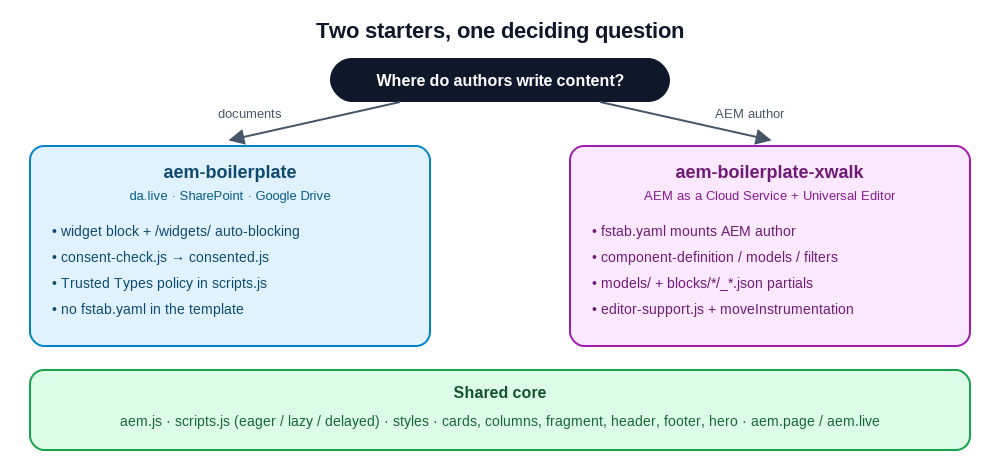
On EDS this setup is often called "xwalk" (crosswalk), after Adobe's boilerplate. Each block gets a component model that defines the fields in the properties rail. The definition, model and filter JSON files describe which blocks exist, what fields they have and where they can be placed:
// blocks/teaser/_teaser.json (merged into component-models.json at build time)
{
  "models": [
    {
      "id": "teaser",
      "fields": [
        { "component": "reference", "name": "image", "label": "Image" },
        { "component": "text", "name": "imageAlt", "label": "Alt text" },
        { "component": "richtext", "name": "text", "label": "Text" }
      ]
    }
  ]
}
The gotcha: there is no Style System and no Responsive Grid. Layout comes from sections and block variants that developers define. Authors used to resizing components in the grid will need training. Plan for it.
Recent UE releases have improved this. Images are supported in the rich text toolbar for AEMaaCS-persisted content (April 2026), publishing errors show up in UE and Sites Admin (early access), and JSON-LD is validated before publishing.
When Document Authoring is right#
- Marketing sites, campaign pages, microsites where speed to publish matters more than complex governance.
- Authors who already live in documents and would rather not learn a CMS.
- Teams that want the fastest path to a 100 Lighthouse score with minimal back-end.
The model is simple: a heading starts content, a horizontal rule (---) starts a new section, and a table whose first row is the block name becomes a block:
| Cards (highlight) | |
|---|---|
| ![image] | Fast Pages that load in under a second |
| ![image] | Simple Write in a document, publish with a click |
That table becomes <div class="cards highlight">, which blocks/cards/cards.js decorates.
The gotcha: if six months in the business asks for MSM-style language inheritance or a multi-step legal approval, check whether DA covers it before you promise it.
Questions to ask in the kickoff#
- Is this a new site or an evolution of an existing AEM Sites build?
- Will the front end be EDS, headless, or HTL?
- Who are the authors, and what tools do they already use daily?
- Which governance features are non-negotiable: workflows, translation, MSM, audit?
- Do you need Content Fragments shared across channels?
- What's the performance target? Is a Core Web Vitals pass a KPI?
Two "no"s on questions 4 and 5 and you're probably a Document Authoring project. A "yes" to either, on EDS, means Universal Editor.
Can you mix them?#
Yes, and most enterprises will. A common 2026 setup:
- The existing corporate site stays on Page Editor.
- New product and campaign sites go on EDS + Universal Editor, sharing Content Fragments with the app.
- Fast-turnaround microsites use EDS + Document Authoring.
The thing that ties them together is your design system and block library. Build blocks once, follow EDS conventions, and both UE and DA can author them.
Key takeaways#
- Default for new work: Universal Editor, per Adobe's guidance.
- Keep the Page Editor for mature HTL/Core Component sites. Don't rewrite for the sake of it.
- Pick Document Authoring when speed and simplicity beat governance.
- UE and DA don't have a Style System or Responsive Grid. Layout is sections and block variants, so budget for author training.
Sources: Page Editor and Universal Editor · Universal Editor introduction · Universal Editor 2026.04.09 release notes · Maintenance release 2026.7.0 · AEM Cloud + Summit 2026 community thread