 EDS Coder
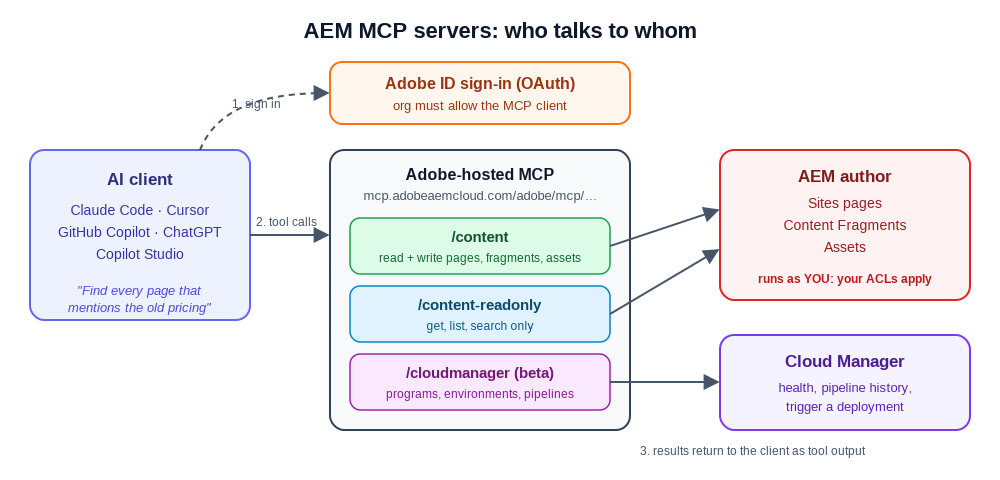
Until recently, getting an AI assistant to "look at our AEM content" meant exporting pages to a spreadsheet, writing a custom Sling servlet, or copying text into a chat window. Adobe now hosts Model Context Protocol (MCP) servers for AEM as a Cloud Service. An AI client such as Claude, Cursor, GitHub Copilot or ChatGPT can now read and change your pages, Content Fragments and assets directly, as you and with your permissions.
This guide covers what the servers are, how to connect, what you can do with them, and the guardrails to put in place before you hand an AI write access to production content.
What MCP is, in one paragraph#
MCP is an open protocol that lets an AI application discover and call tools exposed by a server. The server describes each tool (name, inputs, what it returns), and the model decides when to call it. For AEM, the tools work on pages, fragments, assets and pipelines. Instead of you clicking through Sites, the assistant calls something like "search pages", reads the result and continues the task.
The three Adobe-hosted endpoints#
All three are hosted by Adobe under https://mcp.adobeaemcloud.com/adobe/mcp/. You don't deploy anything into your AEM environment.
| Endpoint | What it can do | Use it for |
|---|---|---|
/content |
Read and write: create, read, update and delete pages and Content Fragments, plus asset import and asset search | Bulk edits, fragment creation, content migration help |
/content-readonly |
Get, list and search pages and Content Fragments, plus asset search | Audits, reporting, Q&A over content: the safe default |
/cloudmanager (beta) |
Programs, environments, repositories and pipelines: check health, read pipeline history, trigger a run | Developers who want deployments without leaving the IDE |
The content servers need AEM release 26309 or later. The Cloud Manager server is in beta. Adobe's documentation says to request access by emailing aemcs-mcp-feedback@adobe.com with your use case.
Tip: Start every team on
/content-readonly. Move to/contentonly for specific people and specific jobs.
How authentication and permissions work#
This is the part that makes the servers usable in an enterprise:
- You sign in with your Adobe ID. The client starts an OAuth flow the first time it connects. There are no shared API keys to store in a config file.
- Your organization must allow the client. An admin controls which MCP clients can connect, so a random tool can't reach your author tier just because a user installed it.
- Every call runs as you. The tools respect your AEM permissions. If you can't edit
/content/brand/fr, neither can your assistant.
Treat the assistant as an extra pair of hands that holds your access, no more and no less. That's also why the read-only endpoint is the right default.
Connecting your client#
Claude Code#
Run this from your project folder:
# Read-only content access (recommended to start)
claude mcp add --transport http aem-content-ro \
  https://mcp.adobeaemcloud.com/adobe/mcp/content-readonly

# Cloud Manager (beta, after Adobe grants access)
claude mcp add --transport http adobe-cloud-manager \
  https://mcp.adobeaemcloud.com/adobe/mcp/cloudmanager
Restart Claude Code. The first tool call opens the Adobe sign-in in your browser.
Cursor#
Add the server to .cursor/mcp.json in the project, or to the global file:
{
  "mcpServers": {
    "aem-content-ro": {
      "url": "https://mcp.adobeaemcloud.com/adobe/mcp/content-readonly"
    }
  }
}
GitHub Copilot in VS Code#
Use .vscode/mcp.json:
{
  "servers": {
    "aem-content-ro": {
      "type": "http",
      "url": "https://mcp.adobeaemcloud.com/adobe/mcp/content-readonly"
    }
  }
}
Check that it worked#
Ask the assistant: "List the AEM MCP tools you have available." Adobe recommends this check, and it's the most reliable one, because tool names change between releases. If the list is empty, the sign-in didn't complete or your organization hasn't allowed the client.
Five prompts that are actually useful#
These work on the read-only endpoint unless marked otherwise.
- Content audit: "Find every page under
/content/wknd/us/enthat still mentions 'free shipping over $50' and list the paths with the sentence in context." - Fragment inventory: "List the Content Fragments using the
articlemodel that have no hero image, sorted by last modified." - SEO check: "For the 20 most recently modified pages, list any with a missing or duplicate page title or description."
- Asset search: "Search assets tagged
campaign:spring-2026and tell me which are not referenced by any page." - (read-write) Controlled bulk edit: "Create a draft Content Fragment for each row in this table using the
faqmodel. Do not publish. Give me the list of paths you created."
Notice the pattern in the last one: a scoped task, draft only, and a list of what changed so a person can review it.
Guardrails before you allow writes#
- Separate the servers. Give most people only
/content-readonly. Add/contentas a separate, clearly named server entry, so nobody ends up writing to content by accident. - Check the read-only allowlist. Adobe has a knowledge-base article about a case where the read-only server still exposed a write-capable tool (Content Fragment variations) because it stayed on the allowlist. The fix is to remove write tools from the allowlist. Check this before you call the endpoint "safe".
- Use a non-production environment first. Point experiments at dev or stage author.
- Never let the assistant publish. Keep publishing in your normal workflow, with a person approving.
- Ask for a change log in the prompt. "List every path you changed" turns an opaque action into a reviewable one.
- Use a least-privilege account for automation. If a pipeline or bot uses the server, give it its own user with narrow ACLs.
Content MCP vs building your own MCP server#
There are community MCP servers for AEM that call the Sling or Assets HTTP APIs directly. They can do more, but you then own the authentication, hosting and security review. Use Adobe's hosted servers when you want enterprise sign-in, permissions that follow the user, and zero hosting. Build your own only for operations Adobe doesn't expose, and keep it read-only where you can.
Where this is heading#
MCP is how Adobe is connecting its newer AI features: the hosted content and Cloud Manager servers, the "Agents in AEM" beta and agent skills for developers. If your team learns to scope, review and audit AI actions on the read-only server now, you'll be ready when the more autonomous features land.
Key takeaways#
- Adobe hosts three MCP endpoints for AEMaaCS:
/content,/content-readonlyand/cloudmanager(beta). - Sign-in uses your Adobe ID, and every call respects your AEM permissions.
- Start read-only, check the allowlist, keep publishing in human hands.
- Verify available tools by asking the assistant to list them. Tool names change.
Sources: Using MCP with AEM as a Cloud Service · MCP Servers in AEM · Cloud Manager MCP Server · Prevent write operations on the read-only MCP server · AEM 2026.1.0 release notes