 EDS Coder
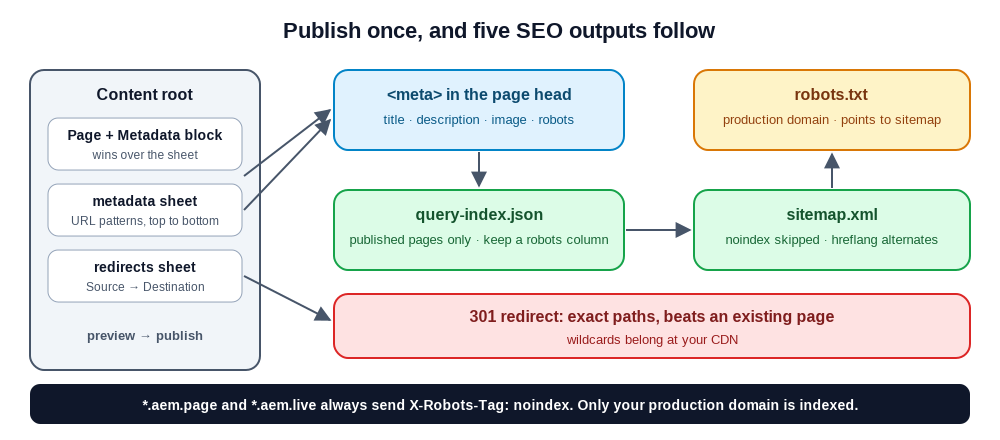
Edge Delivery Services gives you a lot of SEO for free: fast pages, server-rendered content and an automatic sitemap. It also hides a few traps that only show up after launch, like a redirect that silently hides a live page, or a fragment that ends up in Google.
This guide covers the five tools you actually use (metadata, the query index, sitemaps, redirects and robots), how they connect, and a checklist for go-live.
What EDS already does for you#
- Canonical content is in the initial HTML. The page body is rendered on the server, so crawlers and LLM agents that don't run JavaScript still see the real content.
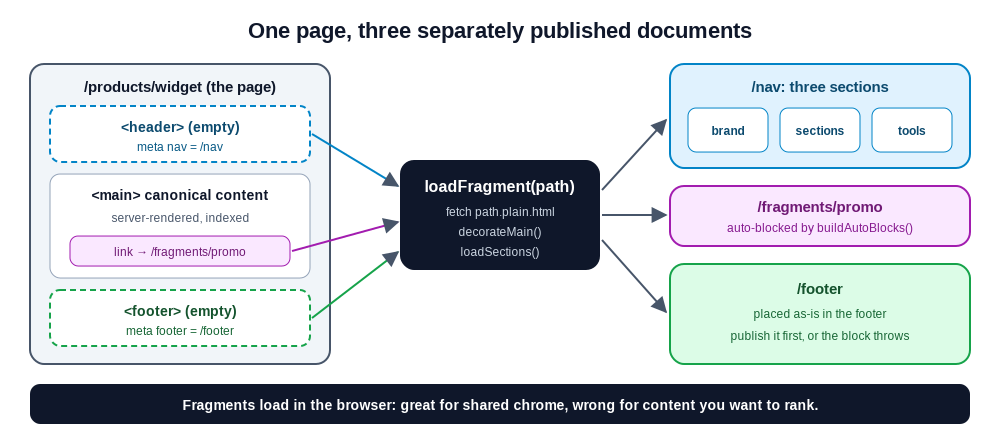
- Header, footer and fragments are not. They're fetched and decorated in the browser. Google's second, rendering pass usually picks them up, but don't put primary content in them.
- Preview and origin domains are hidden from search. Every response from
*.aem.pageand*.aem.livecarriesX-Robots-Tag: noindex, nofollowand a disallow-allrobots.txt. Both go away automatically once traffic comes through your production CDN. - Speed is a ranking signal. Keeping Core Web Vitals green is the cheapest SEO work you'll ever do.
1. Metadata: page level and in bulk#
Each document can end with a Metadata block: a two-column table of key and value. It becomes <meta> tags in the <head>. Common keys are title, description, image, robots, template and theme.
For rules that apply to many pages, create a metadata sheet in the content root (metadata.xlsx in SharePoint). The first column is URL, holding a path pattern, and every other column is a property:
| URL | robots | image |
|---|---|---|
/** |
/media/default-share.png |
|
/drafts/** |
noindex, nofollow | |
*/fragments/* |
noindex |
Rules to remember:
- The sheet is read top to bottom, so the site-wide
/**row must come first. - The page's own Metadata block wins over the sheet.
- A value of
""removes a tag. For example, aCanonicalcolumn set to""on/**removes the default canonical link. - Preview and publish the sheet. Editing it does nothing until you publish.
2. The query index#
The query index is a JSON list of your published pages: by default at /query-index.json. It powers blog listings, search, related content and, importantly, the sitemap.
The easiest way to set one up is the Index Admin tool on aem.live. Add the properties you want and click Reindex. The built-in properties are read from the page <head>: title (from og:title), description, image (og:image), author, date (publication-date), category, tags (article:tag), robots and lastModified.
For anything else, define it with a CSS selector in helix-query.yaml (or the index configuration in the config service):
version: 1
indices:
  blog:
    include:
      - /blog/**
    target: /blog/query-index.json
    properties:
      title:
        select: head > meta[property="og:title"]
        value: attribute(el, "content")
      teaser:
        select: main > div p
        value: words(textContent(el), 0, 30)
      robots:
        select: head > meta[name="robots"]
        value: attribute(el, "content")
      lastModified:
        select: none
        value: parseTimestamp(headers["last-modified"], "ddd, DD MMM YYYY hh:mm:ss GMT")
Things that catch people out:
- Only published pages are indexed. A page that has only been previewed won't appear, even on
aem.page. - Selectors run on the server HTML, not the decorated DOM. Use View Page Source, not DevTools, to write them.
aem up --print-indexprints each page's index record locally as you browse. - Always index
robots. The sitemap only skipsnoindexpages if the index has arobotscolumn. - Only Google Drive and SharePoint sites can filter pages out of the index on the server (with a
helix-defaultsheet). With other sources, filter byrobotsin your block instead. - To check one page, call
https://admin.hlx.page/index/<org>/<site>/<branch>/<path>.
3. Sitemaps#
With no configuration at all, EDS serves /sitemap.xml with every published page. Set cdn.prod.host in your site configuration so the sitemap uses your real domain instead of aem.live.
For more control, add helix-sitemap.yaml (or the sitemap configuration in the config service). The most common upgrade is multilingual sitemaps with hreflang:
sitemaps:
  website:
    default: en
    lastmod: YYYY-MM-DD
    languages:
      en:
        source: /en/query-index.json
        destination: /sitemap-en.xml
        hreflang: en
      fr:
        source: /fr/query-index.json
        destination: /sitemap-fr.xml
        hreflang: fr
        alternate: /fr/{path}
Pages that share a path suffix (/en/pricing and /fr/pricing) are linked as alternates automatically, and default: en adds an x-default entry. If the French page has a different path, set a primary-language-url metadata value on it and index that property.
A single sitemap is limited to 50,000 URLs and 50 MB. Keep a sitemap-index.xml in your repository that lists each one.
4. Redirects#
Redirects live in a redirects sheet in the content root, with two columns: Source (a path) and Destination (a path or a full URL). They return a 301 and are previewable on aem.page before you publish.
Two behaviors to know:
- A redirect beats a page. If a redirect's source matches an existing page, visitors get the redirect and the page is hidden. Delete the redirect and the page comes back, unless it was unpublished.
- No wildcards. The sheet only does exact paths, on purpose: wildcard rules tend to create redirect loops and 301s into 404s. If you really need
/old/*→/new/$1, do it at your CDN.
For a migration, the playbook is: redirect your most-visited old URLs one to one, handle simple patterns (like dropping .html) at the CDN, don't send removed pages to the home page, and after launch watch 404s in Operational Telemetry and add redirects for real traffic.
Also avoid chains. A visit to / that redirects to /en and then to /en/home pays twice, and those delays show up in field data even though lab tests skip them.
5. robots.txt and noindex#
On your production domain, EDS serves a default robots.txt that allows everything and points to /sitemap.xml. Customize it with the robots.txt editor or the config API.
The important distinction: Disallow doesn't remove a page from Google. A blocked URL can still appear in results, and Google can't see a noindex on a page it isn't allowed to crawl. To remove a page, allow crawling and set robots: noindex in its metadata (or the bulk sheet).
Fragments deserve a noindex too. The */fragments/* row in the table above keeps them out of search, the query index and the sitemap.
Go-live SEO checklist#
- [ ] cdn.prod.host is set; sitemap.xml shows production URLs
- [ ] robots.txt on the production domain references the sitemap(s)
- [ ] Query index includes a robots column; noindex pages are absent from the sitemap
- [ ] Bulk metadata gives every page a default share image
- [ ] Fragments, nav and footer are noindex
- [ ] Top old URLs have 1:1 redirects; no chains, nothing redirected to the home page
- [ ] X-Robots-Tag is absent on the production domain
- [ ] Operational Telemetry 404 report checked in week one
Key takeaways#
- Page metadata wins over the bulk
metadatasheet; publish the sheet after every change. - The query index only contains published pages, uses server HTML selectors, and needs a
robotscolumn. - Sitemaps are automatic; set
cdn.prod.host, and usehelix-sitemap.yamlforhreflang. - Redirects are exact-path 301s that take priority over pages. Use the CDN for patterns.
- To remove a page from search, use
noindex, notDisallow.
Multilingual sites need more than hreflang. See Multi-Site and Multilingual EDS.
Sources: aem.live: Indexing · aem.live: Indexing reference · aem.live: Sitemaps · aem.live: Redirects · aem.live: Robots · aem.live: Bulk metadata · aem.live: SEO and GEO