 EDS Coder
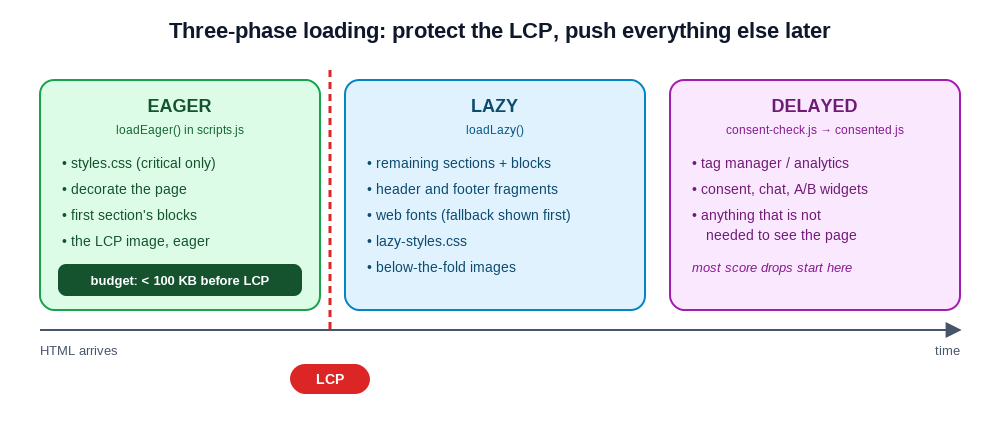
Every Edge Delivery Services project reaches the same meeting: marketing needs analytics, a tag manager, a consent banner and probably a chat widget. Developers worry about their 100 Lighthouse score. Both sides are right, and the boilerplate now has a clear answer for where that code goes.
Older projects put third-party code in scripts/delayed.js and loaded it after a three-second timer. The current aem-boilerplate replaces that with a consent gate: consent-check.js decides, and consented.js loads only after the visitor says yes. This post explains how the gate works, how to connect a real consent platform, and where each kind of tag belongs.
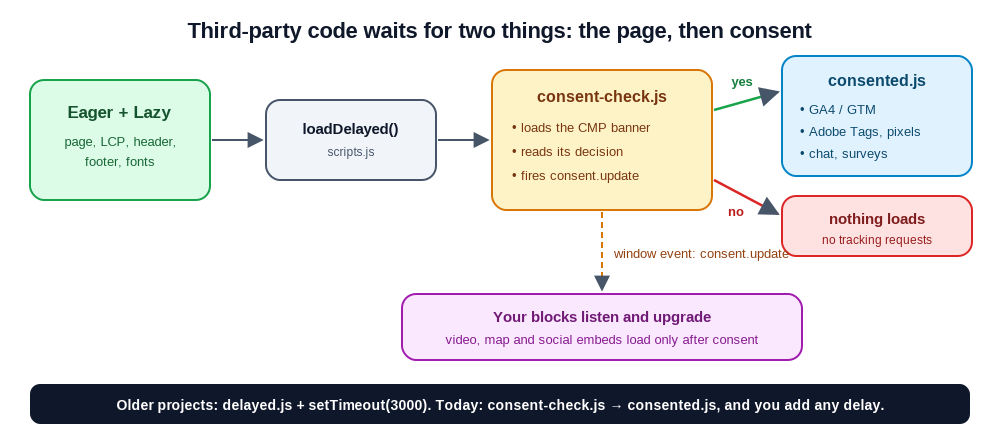
How the boilerplate loads third-party code today#
The last phase in scripts/scripts.js is short:
function loadDelayed() {
  import('./consent-check.js');
  // load anything that can be postponed to the latest here
}

async function loadPage() {
  await loadEager(document);
  await loadLazy(document);
  loadDelayed();
}
consent-check.js has three jobs:
- Decide whether the visitor has consented.
- Announce the decision with a
consent.updateevent onwindow, so any block can react. - Import
consented.jsonce, and only when consent is granted.
Out of the box, the decision is a placeholder that declines by default. You can flip it for testing with a query parameter:
https://main--site--org.aem.page/?consent=accept
https://main--site--org.aem.page/?consent=decline
consented.js starts empty, with one comment: add functionality that requires user consent here (analytics, martech, etc.). That file replaces the old delayed.js as the home for tracking code.
What happened to the three-second delay?#
loadDelayed() no longer waits on a timer. Adobe's performance guidance still says the delayed phase should start at least three seconds after LCP, so the page settles first. If your tags are heavy, add the wait yourself, for example at the top of consented.js:
// scripts/consented.js
import { loadScript } from './aem.js';

await new Promise((resolve) => { setTimeout(resolve, 3000); });
await loadScript('https://www.googletagmanager.com/gtm.js?id=GTM-XXXXXXX');
If you upgraded from an older project, check that nothing still imports delayed.js alongside the new gate. Two loaders means tags may fire without consent.
Wiring a real consent platform#
The placeholder exists so you can build and test the consented path before legal picks a vendor. To connect a real consent management platform (CMP), replace the body of consent-check.js so it:
- loads the CMP script from inside
consent-check.js, not fromhead.html, to keep it off the critical path; - listens to the CMP's own callback instead of reading a query parameter;
- dispatches
consent.updateand callsloadConsented()when the categories you need are granted.
Here is the OneTrust version, adapted from Adobe's CMP guide:
// scripts/consent-check.js
let consentedLoaded = false;

function loadConsented() {
  if (consentedLoaded) return;
  consentedLoaded = true;
  import('./consented.js');
}

// OneTrust calls this when the banner loads and whenever preferences change
window.OptanonWrapper = () => {
  const groups = window.OnetrustActiveGroups || '';
  const consented = groups.includes('C0002'); // performance/analytics; adjust to your categories
  window.dispatchEvent(new CustomEvent('consent.update', { detail: { consented } }));
  if (consented) loadConsented();
};

const script = document.createElement('script');
script.src = 'https://cdn.cookielaw.org/scripttemplates/otSDKStub.js';
script.setAttribute('data-domain-script', 'your-onetrust-domain-id');
document.head.append(script);
Cookiebot works the same way, with CookiebotOnConsentReady, CookiebotOnAccept and CookiebotOnDecline events and the state on window.Cookiebot.consent.
Two trade-offs to raise with legal early#
- The banner appears a few seconds late. Because the gate runs in the delayed phase, so does the banner. That is deliberate. If your compliance team requires the banner immediately, load only the banner script earlier (from
loadEager()), and keep every tracking script insideconsented.js. - Automatic script blocking conflicts with this pattern. Cookiebot's
data-blockingmode="auto"needs to be the first script inhead.html. If you rely on it, accept that cost, and still gate your own project code manually.
Where each kind of tag belongs#
| Code | Where it goes | Why |
|---|---|---|
| CMP banner | consent-check.js (or eager, if legal insists) |
It decides everything else |
| GA4, GTM, Adobe Tags, pixels | consented.js |
Needs consent, never needed for LCP |
| Chat widgets, survey tools | consented.js, or on first interaction |
Heavy and rarely used right away |
| Personalization (Target, AJO) | Adobe's martech plugin, early | Must apply before render to avoid flicker |
| Real User Monitoring | Already built in (sampleRUM in aem.js) |
Privacy-friendly, no cookies |
Google Analytics and Tag Manager#
The simplest setup is one loadScript() call in consented.js. For larger setups, Adobe publishes the aem-gtm-martech plugin. It splits GA4 and multiple GTM containers across the lazy and delayed phases and takes a consentCallback, so default consent is "denied" until your CMP says otherwise.
Adobe Analytics, Target and Journey Optimizer#
Personalization is the one case where "load it last" fails: if Target changes the hero after it renders, visitors see flicker. Adobe's aem-martech plugin solves this by loading the Web SDK early, applying page changes as each block renders, and loading Adobe Experience Platform Tags in the delayed phase. Adobe's own measurements on mobile: about +0.2 s LCP when no personalization applies, and up to +1.2 s when Target changes the page. Budget for that before promising both 100 and personalization. The plugin defaults consent to pending. Don't change that default without your legal team.
Let blocks react to consent#
The consent.update event is useful beyond tracking. A video block, for example, can show a static poster to everyone and only load a YouTube iframe (which sets cookies) for visitors who have consented and click play:
let consented = false;
window.addEventListener('consent.update', (e) => { consented = e.detail.consented; });

export default function decorate(block) {
  const link = block.querySelector('a'); // the authored YouTube link
  const play = document.createElement('button');
  play.className = 'play';
  play.setAttribute('aria-label', 'Play video');
  block.append(play);
  play.addEventListener('click', () => {
    if (!consented) {
      block.classList.add('needs-consent');
      return;
    }
    const iframe = document.createElement('iframe');
    iframe.src = link.href.replace('watch?v=', 'embed/');
    iframe.allow = 'autoplay; encrypted-media';
    block.replaceChildren(iframe);
  });
}
The same pattern works for maps, social embeds and chat launchers: render something light first, upgrade it only after consent and intent.
Watch out for the Content Security Policy#
The boilerplate's head.html ships a strict Content Security Policy with a nonce, 'strict-dynamic' and require-trusted-types-for 'script'. In practice:
- Scripts added by your own code (
loadScript,document.createElement('script')) load fine, because'strict-dynamic'trusts scripts created by trusted scripts. - Inline snippets pasted into
head.htmlwithout the nonce are blocked. That's good: they shouldn't be there anyway. - Vendor code that relies on
document.writeor injects inline<script>HTML may be stripped by the default Trusted Types policy. Check the Console for CSP or Trusted Types errors whenever you add a vendor.
A test plan before you merge#
- Load the branch preview with no consent. In the Network tab, confirm that
consented.jsis not requested and no analytics domain is contacted. - Accept consent (or use
?consent=acceptwhile on the placeholder). Confirmconsented.jsloads once and your tags fire. - Decline, then accept in the same session. Confirm
consent.updatefires both times with the rightdetail.consentedvalue. - Run PageSpeed Insights on the preview without consent. That's what crawlers and most first-time visitors get, and it should still be 100.
- Check the Console for CSP and Trusted Types errors.
Key takeaways#
- The boilerplate now gates third-party code:
loadDelayed()→consent-check.js→consented.js. consented.jsreplacesdelayed.jsas the home for analytics and tags. Add your own delay if your tags are heavy.- Replace the placeholder decision with your CMP's callback, and load the CMP script from
consent-check.js. - Personalization is the exception that loads early. Use Adobe's martech plugin and plan for its cost.
- Blocks can listen to
consent.updateto upgrade embeds only for consenting visitors.
For the loading model behind all of this, see How to Keep a 100 Lighthouse Score on EDS.
Sources: aem.live: Adding your own consent management platform · aem.live: Keeping it 100 · aem.live: Adobe Experience Cloud integration · aem.live: Google Analytics and Tag Manager integration · adobe/aem-boilerplate on GitHub